Supplier status a buyer can check in one click
SupplierTrust Verified turns a supplier’s entry in a list or register your department designates into a signed, revocable badge on the supplier’s own website. A buyer clicks the badge to check it against that record, then keeps a signed receipt for the procurement file.
On the supplier’s siteatlantic-robotics.example
SupplierTrust
Atlantic Robotics
Verified
Source claim verified
Listed in the demonstration supplier register
Valid until October 31, 2026
This does not establish contract award, general good standing or procurement eligibility.
Review this evidenceCopied to another siterobotics-deals.example
SupplierTrust
Badge copied to another website
Can’t verify this badge here
Open the supplier’s authorized website to check this badge.
After the issuer revokes itatlantic-robotics.example
SupplierTrust
Atlantic Robotics
Revoked
Credential revoked
The issuer revoked this credential, so the badge no longer verifies. A replacement would be a new credential.
Review this evidenceConditionally qualified for testing through Innovative Solutions Canada, September 2026Offer TS13-023685
What the buyer sees after one click
The result comes first, in plain words, with the time it was observed. Each of the five checks is listed with its own result, and a successful check gives the buyer a signed receipt to keep with the procurement file.
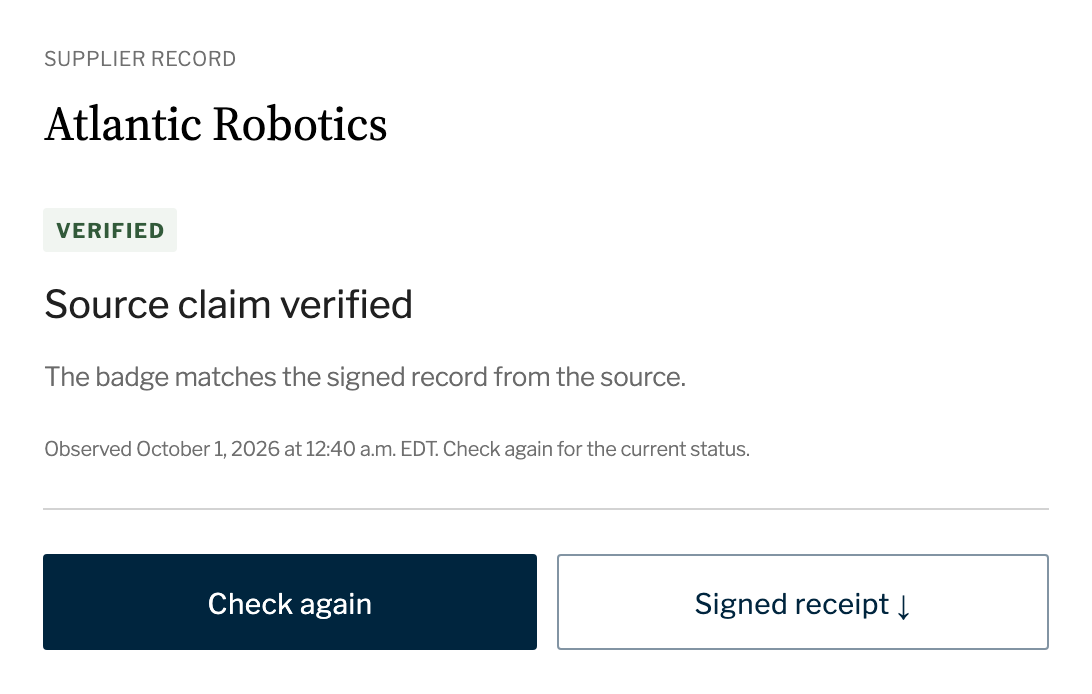
The result, and a signed receipt for the file.
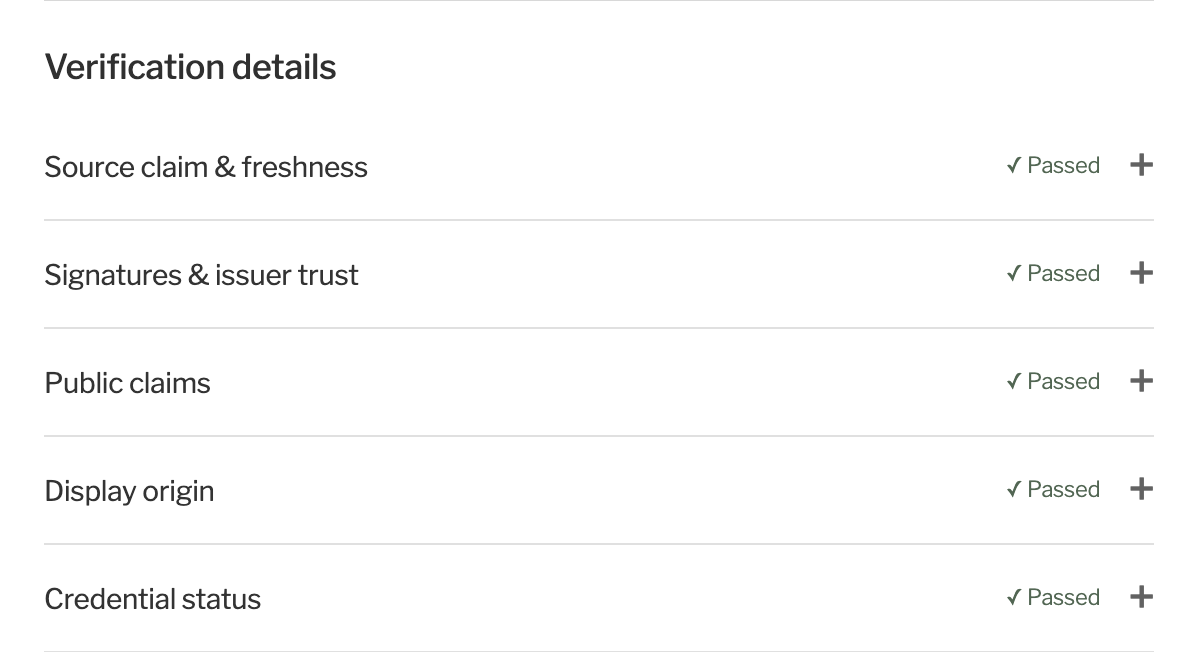
Five checks, each with its own result: the source and its age, the signatures, the public claims, the website showing the badge, and the credential’s status.
When a claim doesn’t hold, the buyer sees why
Four other results a buyer can see, and what each one means.
Copied to another website
Can’t verify this badge here
Open the supplier’s authorized website to check this badge.
Check the badge on the supplier’s own website instead.
A listing, not an award
Listing verified
Listing verified. Not proof of a contract award.
This source supports a standing-offer listing; it does not establish a contract award or good standing.
If you need proof of an award, ask for it separately.
Out-of-date source
Claim not established
Source evidence is too old
The source record is older than this check allows. It needs to be refreshed.
The record needs a fresh read from the source. Check again once it’s refreshed.
Revoked by the issuer
Revoked
Credential revoked
The issuer revoked this credential, so new checks fail. Earlier receipts record what was checked, and when.
Don’t rely on this badge. Receipts from earlier checks remain on file.
Demo video (1:41)
A walkthrough of the prototype, narrated by a synthetic voice, with captions and a full transcript.
Read the transcript
SupplierTrust Verified. Supplier status a buyer can check in one click.
Checking a supplier’s status can mean searching records by hand.
A supplier displays this badge on its website. A buyer can open the evidence behind it.
In one click, the buyer checks the evidence. The buyer can inspect the five checks behind the result. A signed receipt retains the result for the procurement file.
The evidence names the source and when the record was captured. This demonstration uses fictional suppliers and a test issuer.
A copied badge does not verify on another website. The buyer can open the authorized supplier page to check it.
The result says exactly what the source supports. A standing-offer listing is not proof of a contract award.
The check applies an agreed freshness limit. If the source evidence is too old, the claim is not established.
Revoking the credential causes new checks to fail. Earlier receipts retain the evidence checked and the result at that time.
We propose a test with one department. Ten to twenty suppliers and ten to twenty buyers. They would use public or test data. The sandbox would be in Canada, in English and French. If the program approves the test, Innovative Solutions Canada funds it. Results would be measured against your current process.
To request a test, contact Innovative Solutions Canada. Name SupplierTrust Verified and offer TS13-023685. For a twenty-minute demonstration first, contact us.
Testing it with your department
Innovative Solutions Canada’s Testing Stream pays for qualified innovations to be tested by federal departments and agencies in their own operations.
To ask for a test, email Innovative Solutions Canada at solutions@ised-isde.gc.ca or use its Test an innovation form, and name SupplierTrust Verified, offer TS13-023685.
For a 20-minute demo first, email hello@suppliertrust.ca.
One-page summary: English (PDF, 596 KB) · Français (PDF, 604 Ko)
- Who takes part
- 10–20 buyers from one department and 10–20 of its suppliers.
- What it costs you
- Staff time only. Innovative Solutions Canada pays for an approved test.
- What data it uses
- Public or test records, in a sandbox we would set up in Canada. Nothing connects to your network.
- How long
- Indicative setup: three months, including four weeks to agree on the rules. All work within 12 months of contract award.